.png)
Complete an Online Payment
Navigate to the MGOconnect Customer Portal
-
Go to mgoconnect.org
-
Choose Customer Portal
-
Select your state and Jurisdiction
-
Login with your credentials
-
Select "Dashboard" at the top of the page
-
Open the Permit Project you wish to pay
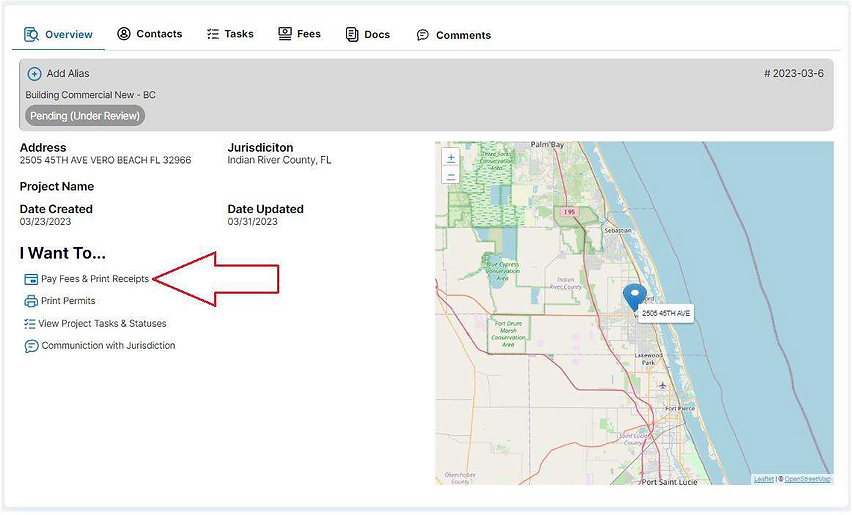
Step #1 - Project Page
After opening the permit card you should be on the “Overview” page of the selected permit.
Click “Pay Fees & Print Receipts” as listed below, or Navigate to the “Fees” page.
Step #2 - Payments
Click the “Payments” tab and scroll all the way to the bottom of the page. Select the items you would like to pay, and click “Pay Online”
If an Error Occurs When the Payment Portal is Opened
MGOconnect (My Government Online) is not a payment provider or credit card processor. If you experience trouble after selecting "Pay Online" (at which time you are taken to the payment portal provided by another entity), it is likely that the third party credit card processor your Jurisdiction has opted to use is experiencing an issue on their end.
In this case, please contact your Jurisdiction directly, as My Government Online may not provide guidance on their behalf.